Before choosing sensors, gates or switches, test the current Aerobask Phenom 300 and FSReborn Phenom 300E for thrust-rating zones, MAX access/detent behavior, lack of reverse, TO/GA input behavior, and whether START is momentary/spring-return to RUN. Record only observable add-on behavior.
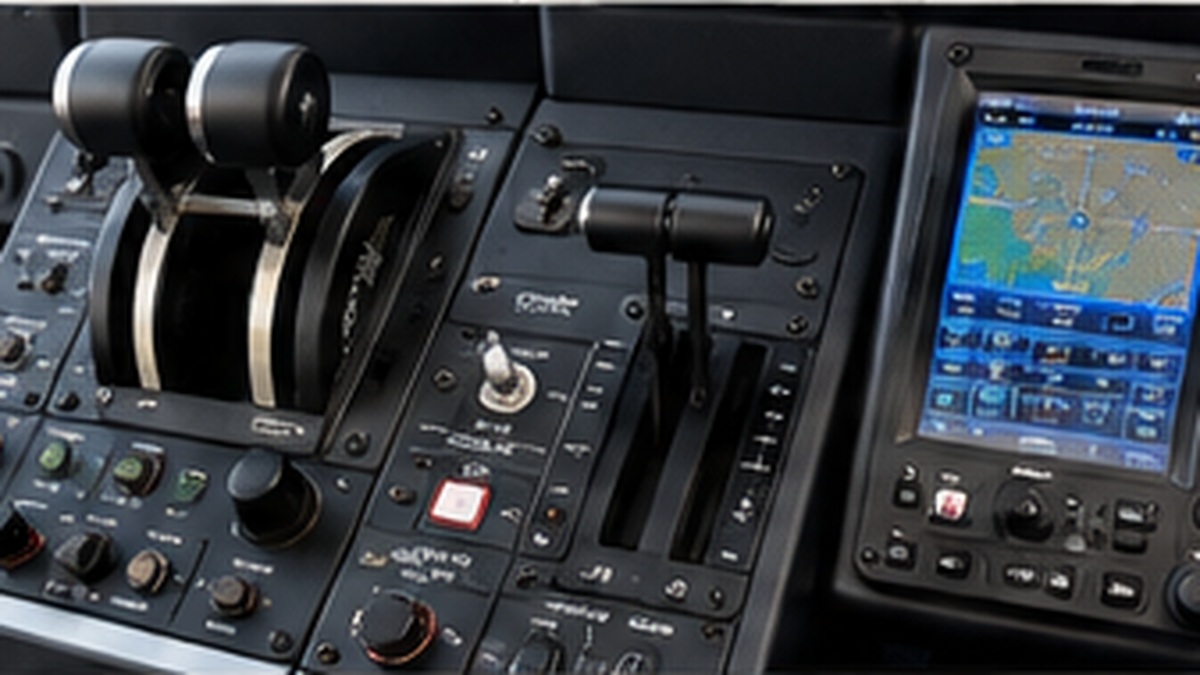
Phenom Center Console
Removable Phenom-specific center console containing thrust levers, TO/GA, flaps, speed brake, engine start/stop controls, T/O CONFIG, parking/emergency brake and the 7-inch GTC touchscreen.
Knowledge (2)Photos (6)Tasks (1)
TASK LIST
2 tasks
Create an exact evidence-based control inventory before mechanical design. For every center-console or pedestal control, record the Phenom 300 implementation, Phenom 300E implementation, whether they are equal/different/absent, and one physical implementation capable of supporting both. Cover thrust levers, detents/reversers, TO/GA, flaps, speed brake, engine start/stop, T/O CONFIG, parking/emergency brake, touchscreen/GCU/GTC use, and any trim, fire or other pedestal control that proves necessary. Distinguish the real aircraft from Aerobask and FSReborn simulation limitations. Do not select dimensions, sensors, switches or BOM yet.
Knowledge
2 items🔗
Phenom 300 vs 300E center-console control inventory
Scope: physical controls needed for one removable console that supports the Aerobask Phenom 300 in X-Plane 12 and the FSReborn Phenom 300E in MSFS 2024. This is an add-on-specific comparison; it does not claim that every real-world Phenom production block has the same avionics. | Control | Aerobask Phenom 300 | FSReborn Phenom 300E | Comparison | Universal physical implementation | |---|---|---|---|---| | Thrust lever L/R | Two independent axes; no reversers; IDLE through TO/GA; strong physical detent between TO/GA and MAX is described | Two independent axes; no reversers; rating changes shown on EIS; manual explicitly says the simulated rating detents are not physical stop detents | Same function, different detent model | Two independent full-range levers with broker-defined rating zones. Provide hard endpoints; keep any TO/GA-to-MAX tactile gate configurable/removable until in-sim testing | | TO/GA L/R | One momentary button on each thrust lever | One momentary button on each thrust lever | Equal | One momentary button per lever; both may publish separate keys that profiles map to the same TO/GA function | | Flap lever | 0 / 1 / 2 / 3 / FULL | 0 / 1 / 2 / 3 / FULL | Equal | One gated five-position lever | | Speed brake | Maintained CLOSE / OPEN switch; multifunction spoilers and automatic ground-spoiler logic | Maintained CLOSE / OPEN switch; not an axis; computer retains automatic ground-spoiler logic | Equal | One maintained two-position lever/switch, not an analog axis | | Engine START/STOP 1 | Rotary STOP / RUN / START | Rotary STOP / RUN / START | Equal function | Three-position rotary; exact spring-return behavior of START to be confirmed before switch selection | | Engine START/STOP 2 | Rotary STOP / RUN / START | Rotary STOP / RUN / START | Equal function | Same as engine 1 | | ENG IGNITION 1 | OFF / AUTO / ON | OFF / AUTO / ON | Equal | Three-position maintained switch | | ENG IGNITION 2 | OFF / AUTO / ON | OFF / AUTO / ON | Equal | Three-position maintained switch | | T/O CONFIG | Momentary test button on pedestal | Momentary test button; documented event and checklist confirmation | Equal | One momentary pushbutton | | Emergency/Parking brake | Combined mechanical handle on pedestal | Combined Emergency/Parking brake handle | Equal | One latching pull/parking-brake handle with position sensing; detailed mechanism later | | Avionics controller | GCU 477 keypad/FMS controller below MFD; Aerobask provides a 2D popup and physical-keyboard support | Prodigy Touch/G3000 with GTC touch controller; captain-side unit is required initially | Different | Fixed 7-inch capacitive display (about 155 × 87 mm visible): captain GTC in 300E profile, GCU/FMS popup or equivalent controller in 300 profile. External pop-out and touch behavior still require testing | | Yaw backup trim | Momentary LEFT / RIGHT control | Momentary LEFT / RIGHT control shown on backup trim panel | Equal | Optional small momentary left/right control; include only if valuable beyond existing flight-control hardware | | Roll backup trim | Momentary LWD / RWD control | Momentary LWD / RWD control shown on backup trim panel | Equal | Optional spring-centered two-direction control | | Pitch backup mode/trim | PITCH BKP mode OFF/BKP plus momentary UP/DN shown on Aerobask panel | Pitch backup mode plus momentary backup pitch UP/DN documented | Equal | Optional guarded/momentary trim block; not a prerequisite for first console prototype | | FCE reset | Not identified as a separately required Aerobask control | FCE 1 / OFF / FCE 2 selector plus RESET momentary documented | 300E-specific in current add-on evidence | Do not dedicate first-prototype space yet; if later included, use a small profile-aware selector/button block | | Fire SHUTOFF 1/2 + BOTTLE | Present on real-style pedestal panel | Present with matching functions | Equal | Required overall, but allocate to the Phenom Systems Panel in this project rather than duplicating it on the center console | | PUSHER CUTOUT | Present on forward systems panel | Present and externally bindable | Equal | Allocate to Systems Panel/misc group, not center console | | Thrust reversers | Absent | Absent | Equal absence | Do not build reverse levers | | Autothrottle control | Not present; Aerobask models CSC but no autothrust | No separate autothrottle control required by the current FSReborn manual | Not required for these two add-ons | No initial autothrottle hardware | Design conclusion: The common center-console core can be one physical unit: dual thrust axes with two TO/GA buttons, five-position flap lever, two-position speed-brake control, two three-position start knobs, two ignition switches, T/O CONFIG, combined parking/emergency brake and the fixed 7-inch touchscreen. Backup trim/FCE controls are secondary and should not drive the first layout. Open evidence checks before mechanical freeze: 1. Aerobask GCU 477 popup on the external 7-inch touch display. 2. FSReborn captain GTC pop-out/touch behavior on the same display. 3. Actual rating-zone/detent and START spring-return behavior in both current add-on versions. Sources: - Aerobask Phenom 300 Flight Manual Rev.2, published by the commercial developer in the official support thread: https://forums.x-plane.org/forums/topic/241927-phenom-300-documentation/ - Aerobask product specification: https://www.aerobask.com/phenom300.php - FSReborn FSR Phenom 300E Pilot's User Manual, especially Cockpit Overview and Annex A: https://fsr300e.fsreborn.com/FSR300E_Manual.pdf
📝
Universal removable Phenom 300 / 300E center console scope
The initial physical conversion uses one universal, removable center console compatible with both Aerobask Phenom 300 in X-Plane 12 and FSReborn Phenom 300E in MSFS 2024. The simulator choice is not yet final and the physical design must not force either simulator. Initial candidate controls: - 2 × thrust lever - TO/GA - flaps with positions 0 / 1 / 2 / 3 / FULL - speed brake - engine START/STOP left and right - T/O CONFIG - parking/emergency brake - trim, fire or other pedestal controls only when the comparative control audit proves they are genuinely necessary A capacitive 7-inch touchscreen with approximately 155 × 87 mm visible area is a fixed part of the console: - Phenom 300E / MSFS: captain-side GTC - Phenom 300 / X-Plane: preferably GCU/FMS controller or another useful avionics interface The touchscreen remains physically present regardless of simulator choice. A second GTC and copilot PFD are outside the initial scope. Mechanical controls should expose functional cockpit keys and be simulator-independent. Differences between the Phenom 300 and 300E should be handled in broker/aircraft profiles wherever practical. No final mechanical layout, dimensions, switch selection, sensors or BOM may be frozen until the control comparison is complete.
Photos
6 photosStart panel